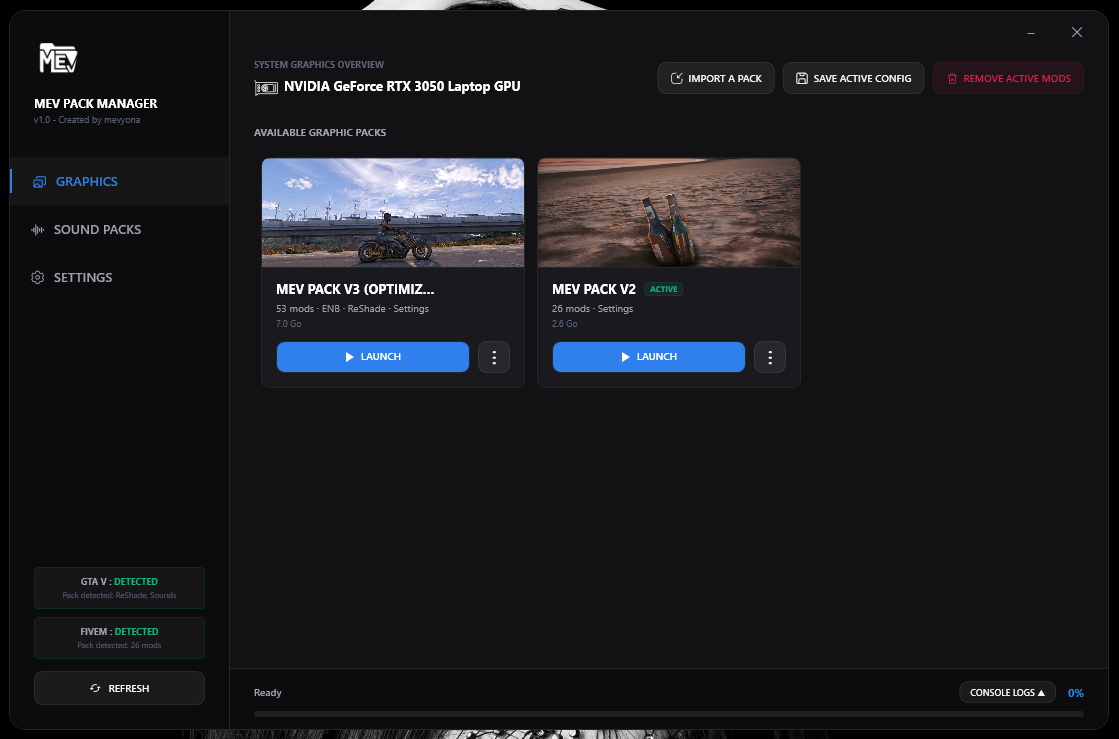
Stop wasting hours manually copying files. MEV Pack Manager automatically installs ENB, ReShade, mods, plugins and settings for GTA V & FiveM โ with smart GPU detection and one-click profiles.
No more guessing which files go where. MEV Pack Manager handles everything automatically.
Simply select any folder into the software. The importer instantly structures files into correct folders.
Install and swap sound packs on the fly. Performs surgical backups and restores vanilla files in one click.
Detects active graphics card (GPU) and injects config to settings.xml to avoid startup crashes.
Configure ReShade and ENB overlay keys directly in-app. No manual configuration of .ini files.
Instantly resolve bugs and crashes by selectively cleaning caches without losing critical server data.
Enjoy ultra-modern UI with custom sounds, micro-animations, and full English/French support.
Immediate downloads, auto-updates, continuous development, and dedicated user support.
From download to gaming with stunning graphics โ it takes less than a minute.
Drop your graphic pack folders into the Packs/ directory next to
the .exe, or import them directly through the app via drag & drop.
The app auto-detects your GTA V and FiveM installations, your GPU model, and copies all files to the right places automatically.
Launch FiveM directly from the app or create a desktop shortcut profile. Switch between packs anytime with a single click.
Download our Free Trial to test core features, or support development on Patreon for the Full experience.
Basic features. Perfect to test the setup.
All features. All updates. Forever.
Follow these steps to install, activate and master MEV Pack Manager.
Download the MEV Pack Manager.exe file attached to the Patreon post. Place it wherever you like on your PC.
Click the Claim Portal button below, enter the email address associated with your Patreon account, and get your personal lifetime license key.
Access Claim PortalClick IMPORT A PACK at the top of the interface, choose the pack type (Graphics or Sounds), select your folder, and let the software do the work.
Go to the GRAPHICS tab, select your desired graphic pack, and click INSTALL. The manager will automatically disable previous mods, inject your GPU profile, configure ENB/ReShade keys, and deploy all files seamlessly.
Go to the SOUND PACKS tab, select your audio pack and click INSTALL. The system automatically backs up your original sounds (first run only), then overwrites GTA V audio files with the modded ones.
For graphics: click REMOVE ACTIVE MODS at the top. For sounds: click the UNINSTALL button in the Sound Packs tab. Both instantly restore your games to their original vanilla state.
If FiveM crashes or fails to connect: go to SETTINGS โ click CLEAR FIVEM CACHE โ select the temporary folders to delete (recommended ones are pre-checked) โ click CLEAR.